
Creating Custom Draw Schedules
Draw Schedules with Flat payments and Custom Calculations/Formulas
In the example below, we have a draw schedule with a Flat payment in the beginning and end, with custom formulas in between.
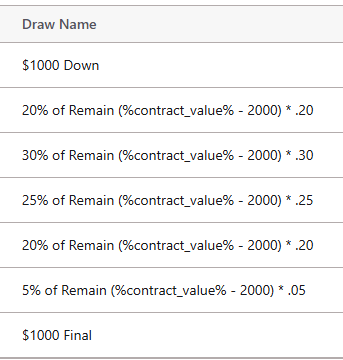
This schedule uses a formula with a fixed $1,000 down payment and fixed $1,000 final payment with custom calculations/formulars in between.
A custom formula for 20% factoring in the flat payments looks like this:
(%contract_value% – 2000) * .20
The Draw Schedule Payments will look like this:
Draw 1, Flat Rate: 1000
Draw 2, Custom Calculation for 20%: (%contract_value% – 2000) * .20
Draw 3, Custom Calculation for 30%: (%contract_value% – 2000) * .30
Draw 4, Custom Calculation for 25%: (%contract_value% – 2000) * .25
Draw 5, Custom Calculation for 20%: (%contract_value% – 2000) * .20
Draw 6, Custom Calculation for 5%: (%contract_value% – 2000) * .05
Draw 7, Flat Rate: 1000
If the total contract value is $52,000, the system calculates it as follows:
- Subtract Fixed Amounts: $52,000 – $2,000 (Down + Final) = $50,000
- Percentages applicant to $50,000:
20% = $10,000
30% = $15,000
25% = $12,500
20% = $10,000
5% = $2,500
3. Add the Fixed Amounts back in: Your total will equal $52,000.
Example of Flat Rate Draw: $1000.00
Example of Custom Calculation/Formula: (%contract_value% – 2000) * .20